Report writing
Write the report during the inspection, not after it.
Vistoria is home inspection report software that writes the report while you walk. Each finding goes into the record your clients already know, dictation works with no signal, and the PDF is made on the phone.
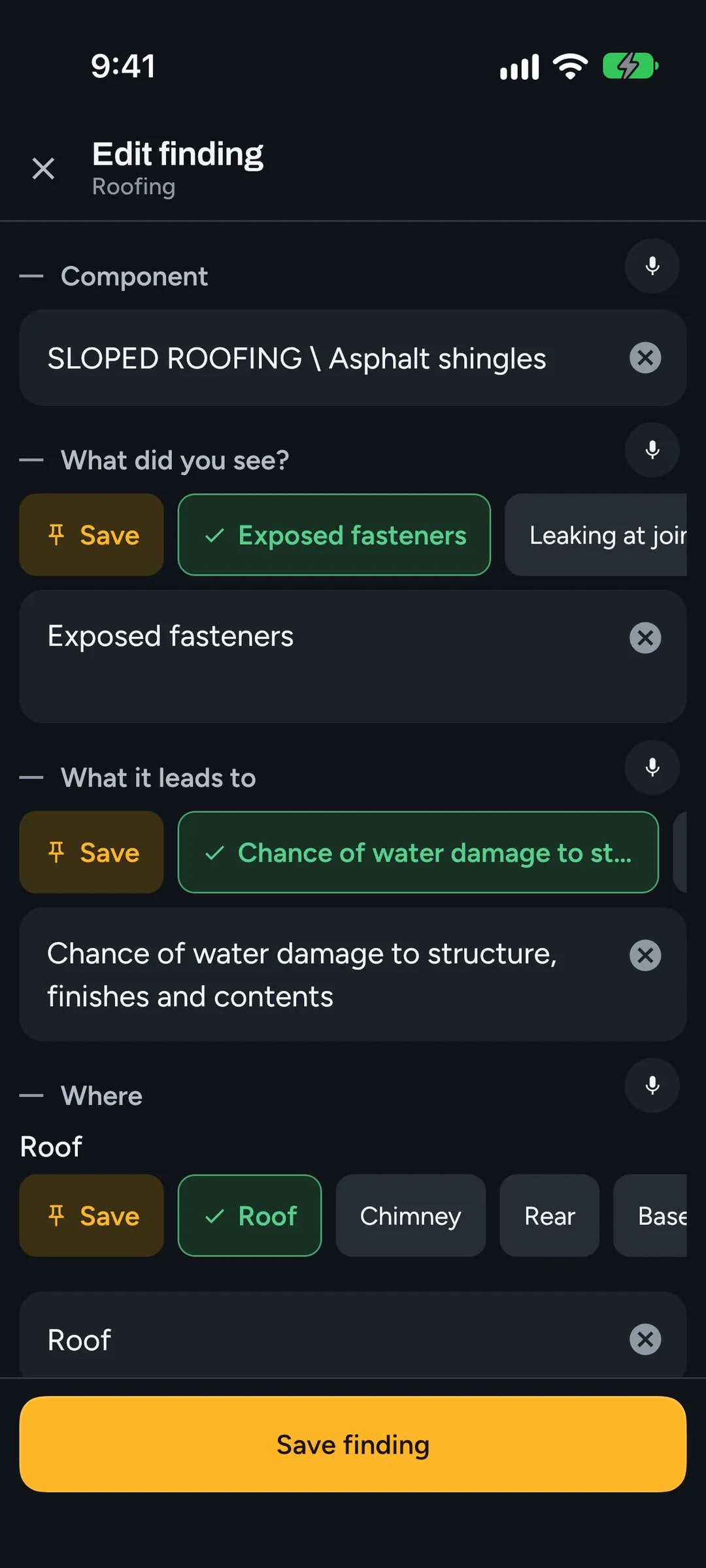
The finding record
A delivered inspection report is a stack of finding records under category headers. The editor writes that structure directly, so nothing has to be rearranged at night.
- CATEGORY \ Component: the header the finding files under
- Condition: the defect itself
- Implication(s): what it can lead to
- Location: where it is
- Task: Repair, Replace, Correct and the rest, from a pick-list
- Time: Immediately, Upon possession, Regular maintenance and the rest, from a pick-list
Talk instead of typing
Tap the microphone in a finding, in the camera or in your notes, and talk. Speech is recognised on the phone itself, so dictation works in a crawlspace with no signal. Fillers drop out, numbers come out as digits, acronyms like GFCI are capitalised, and the sentences are punctuated.
You say “um so two breakers double tapped on the left gfci in the kitchen doesn’t trip” and the finding reads “2 breakers double tapped on the left. GFCI in the kitchen doesn’t trip.” A larger, more accurate speech model downloads by itself the next time the phone is on Wi-Fi.
Your library and your wording
Conditions, implications, locations and Description choices come from your company's library. New offices start from the Vistoria library; Horizon users import their own Company Templates and keep their wording.
“What did you see?” finds the line you mean from shorthand, a misspelling or an everyday name. Free-text fields offer what your company has typed there most, from your own reports only.
Data plates and rewording
Point the camera at a furnace or water heater plate. The phone works out the age from the serial number and fills the blanks; if it can’t tell, it says so. With a connection, it checks for recalls too.
Turn on rewording and what you say comes out in report language, with what you said one tap away. It never changes a number. It is optional, in testing, and on newer phones.
Description and limitations
Each section has a Description of what the house is made of, as Field: Value pairs, and its limitations. Quick fill asks the required Description items one per screen and skips what you already answered. At the end, the limitations run-through goes section by section with the usual choices as chips, such as storage or carpet and furnishings.
The PDF, made on the phone
Export makes the report PDF on the phone, with no upload: your cover and logo, a section strip on every page, finding records with their photos two across, and a summary of the findings you mark for it. Every photo prints once, and a photo that is in no finding stays out of the report.
The office prints the same layout, so the PDF from the desk matches the one from the phone page for page.
Review and publish from the office
The inspection syncs to the office while you walk. At a desk you can preview the report the way the client will see it, fix wording on a full keyboard, and publish. The client gets an email with a link to read the report in a browser and download the PDF, and they can build a repair request from the findings.
Questions.
Does voice dictation need an internet connection?
No. Speech is recognised on the phone, so dictation works offline out of the box. A larger high-accuracy model downloads by itself when the phone is on Wi-Fi.
Will my reports look like the reports my clients know?
The report is set out the way a Horizon report is: CATEGORY \ Component records with Condition, Implication(s), Location, Task and Time, coloured section bars, and captioned photos two across.
Can I edit the report on a computer?
Yes. The office runs in any browser and edits everything the phone edits, including photo markup, with version history. Changes go back to the phone.
Do photos I didn't use end up in the report?
No. Only photos in a finding or on a Description item print. The rest stay with the inspection as Unused photos.
Read next.
Vistoria is in open beta on real inspections. Book a 15-minute call with one of the people who build it.
Book a 15-minute call